
If you’re looking for a premium ergonomic office chair that supports your body throughout the workday, the Humanscale Freedom Headrest Chair is one of the most talked-about designs on the market.
Unlike most office chairs, Freedom is designed to work with your body, automatically adjusting as you move, rather than overwhelming you with knobs, levers, and intricate adjustments. What sets it apart from more traditional office seating is its intuitive nature.So keep reading the review of the Humanscale Freedom headrest chair!
In this review, I’ll explain who this chair is for, what it feels like to use daily, how to adjust it for your body, and whether it’s worth your investment.
Overall Rating: ⭐⭐⭐⭐½ (4.5 out of 5 stars)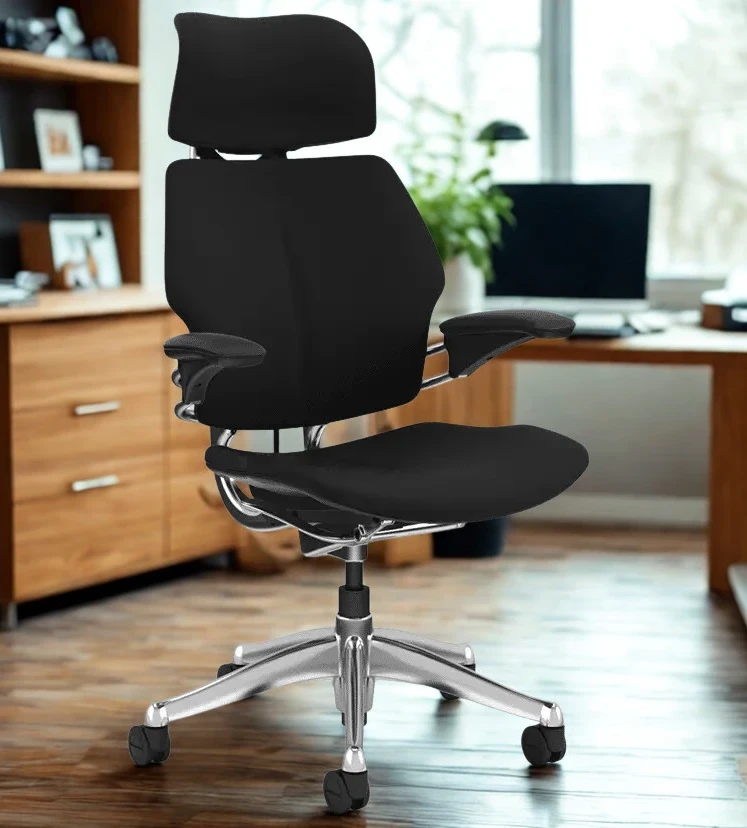
Design & First Impressions
The Freedom Headrest was designed by noted industrial designer Niels Diffrient, a pioneer in ergonomic seating. His goal was simple: reduce the clutter of traditional ergonomic controls and create a chair that intuitively supports your body as you move between postures.
Instead of making you mess with a bunch of settings, Freedom has this cool recline mechanism that just adjusts to your weight. It handles your shifts in position all on its own.
When you first see it, you get that human-friendly vibe right away. It just looks really simple, classy, and way less like a machine compared to a lot of its competitors.
The headrest is all one piece with the chair, the armrests are nice and smooth but still give you good support, and the whole thing feels really solid without being too big.
With all the different fabric and finish choices, like Kvadrat textiles, leather, and Technogel cushioning, you can really pick what works best for your home or office.The design isn’t just pretty; its straightforward nature actually makes it easier to think clearly.
Ergonomics & Comfort — What It’s Like to Sit In
Once seated, the Freedom begins to reveal its ergonomic strengths.
Self-Adjusting Recline
One of the Freedom’s standout features is its self-adjusting recline. Unlike many chairs that require you to lock or unlock recline, or to find the ideal tension setting, Freedom automatically balances support across your full range of motion. Lean back and it responds; return upright and it follows without resistance or abrupt changes.
This way, you can keep your eyes at pretty much the same level even as you switch how you sit, which is super handy if you’re someone who’s always switching between typing, reading things, and jumping on video calls.
Dynamic Headrest
The special headrest in the Freedom chair is made so it moves right along with you.When you lean back, it just swings to support your neck, and when you sit up, it gets right out of the way.
This cool movement keeps your neck supported when you lean back, so you don’t have to strain forward if you’re tired.Just a heads-up from folks who actually own one: the headrest can sometimes slip down slowly.
That’s because it uses friction to stay put, not a mechanical lock.A few small adjustments should help fix this issue.
Seat & Backrest
This seat is designed with a special shape, kind of like a waterfall, and has a cutout for your tailbone. This helps to take pressure off the back of your legs and your tailbone.This small detail definitely helps you stay comfy for longer, especially when you’re stuck at your desk for extended work sessions.
The backrest moves up and down and also swivels on its own, so it always kind of molds to your spine’s curve whenever you shift how you’re sitting.
Armrests
With Freedom, the armrests are linked right to the back frame. That means when you lean back or sit up, they just move along with you naturally.You get plenty of room to adjust the height—we’re talking about 6 inches.
And if you go for the upgraded Duron arms, you’ll also get some extra sideways movement, which is pretty handy.
Some folks have mentioned that the armrests don’t move forward or backward, or even side-to-side on their own, which means you can’t really fine-tune them as much as you might with chairs that offer a ton of adjustment options.
Adjustment Guide — How to Fit the Freedom Headrest to Your Body
One of Freedom’s biggest selling points is its intuitive adjustability. Below is a practical guide to adjusting the chair for a more personalized fit.
1. Seat Height
- Reach under the right side of the seat and lift the lever.
- Raise or lower the seat so your feet rest flat on the floor.
- Ideally, your thighs should be parallel to the floor with a few inches between the seat edge and the back of your knees.
2. Backrest Height
- While seated, grip the lower corners of the backrest.
- Squeeze the handle and slide the backrest up or down.
- Optimal support is where the lumbar curve gently meets the small of your back.
3. Headrest Height
- Gently grasp the headrest with both hands.
- Slide it up or down within its 125 mm range until it supports the base of your skull and the upper neck.
- The dynamic pivot means it will follow your head motion as you recline.
4. Seat Depth
- Lift the lever under the front edge of the seat.
- Slide the seat forward or backward to fit your leg length.
- You should have ~2–4 inches between the seat edge and the back of your knee when seated with back support.
5. Armrest Height & Position
- Gently pull up on the front pad to raise the arms.
- To lower, rotate your wrist back toward you and guide them down.
- Ideally, your arms should rest at ~90° at the elbows with wrists straight while working.
6. Recline Tension (Optional)
- Although the Freedom is designed to automatically balance recline, there is a small hex/Allen adjustment under the seat for fine-tuning recline tension if needed.
- Turning it slightly can make recline easier or firmer depending on your weight and preference. Real users note this can be helpful for lighter individuals.
Pros — What Makes the Freedom Headrest Worth Buying
✔ Intuitive & Automatic Ergonomics
Freedom’s self-balancing recline and dynamic support means less fiddling with knobs and more fluid motion as you work.
✔ Excellent for Long Workdays
The supportive seat, synchronized arms, and dynamic headrest combine for posture support across extended periods.
✔ Minimal Yet Elegant Design
Unlike bulky “gaming” chairs that feel mechanical and aggressive, Freedom’s aesthetic is sleek and adaptable to professional environments.
✔ Dynamic Headrest Support
The headrest moves with you and cradles your neck in recline, which most static headrests fail to do.
✔ Long Warranty
Humanscale stands behind Freedom with a lengthy warranty (often 15 years), reinforcing confidence in its durability.
Cons — Limitations to Consider Before You Buy
✖ Limited Micro-Adjustments
If you love chairs with independent armrest width/depth, tilt locks, or advanced tilt tension systems, Freedom may feel “too simple.”
✖ Price
This is a premium chair—often costing well above average ergonomic seating. Whether it’s “worth it” depends on how much you value build quality, design, and long-term comfort.
✖ Headrest Can Shift
Some users report the headrest sliding down over time because it relies on friction rather than locking detents. Tightening screws can help.
✖ Not Ideal for All Sitting Styles
Freedom shines when you change postures often and work in a reclined-forward hybrid, but if you prefer very upright posture all day with locked tilt, other chairs may suit you better.
✖ Neutral Arm Adjustability
Armrests can be height adjusted, but lack forward/backward and independent fine-tuning found on some competitors.
Is It Worth Buying?
If you spend a lot of time sitting, whether you’re a professional, a creative, or just someone who puts in long hours, the Freedom Headrest Chair is, simply put, a really well-designed ergonomic chair.It’s designed to be really easy to use, so you don’t have to spend a lot of time fiddling with it. Instead, it just offers gentle help for your head, neck, and back.
If you care about how naturally something moves, how well it supports you, and that it’s just really well-made, then you should definitely give this chair a serious look.
Okay, so if having every possible adjustment or super strong forward support is what you really need, you might be better off with something like a Steelcase Leap or a Herman Miller Aeron. Those chairs are usually a better fit if you have really particular ways of sitting.
Final Verdict — Great Chair for Dynamic Comfort
The Humanscale Freedom Headrest Chair is a really good ergonomic chair. It definitely lives up to its name when it comes to how you can move in it, the support it gives, and how easy it is to adjust without thinking too much.You’ll find this a great fit if you’re looking for:
- Knowledge workers and office professionals
- WFH setups where aesthetics and comfort matter
- People who change posture often and value fluid movement
- Those willing to invest in a high-end chair
While not perfect, Freedom’s overall experience makes it a compelling buy if you prioritize lasting comfort and simple ergonomics over a laundry list of adjustments.
Thats it for now peeps, thanks for stopping by!