
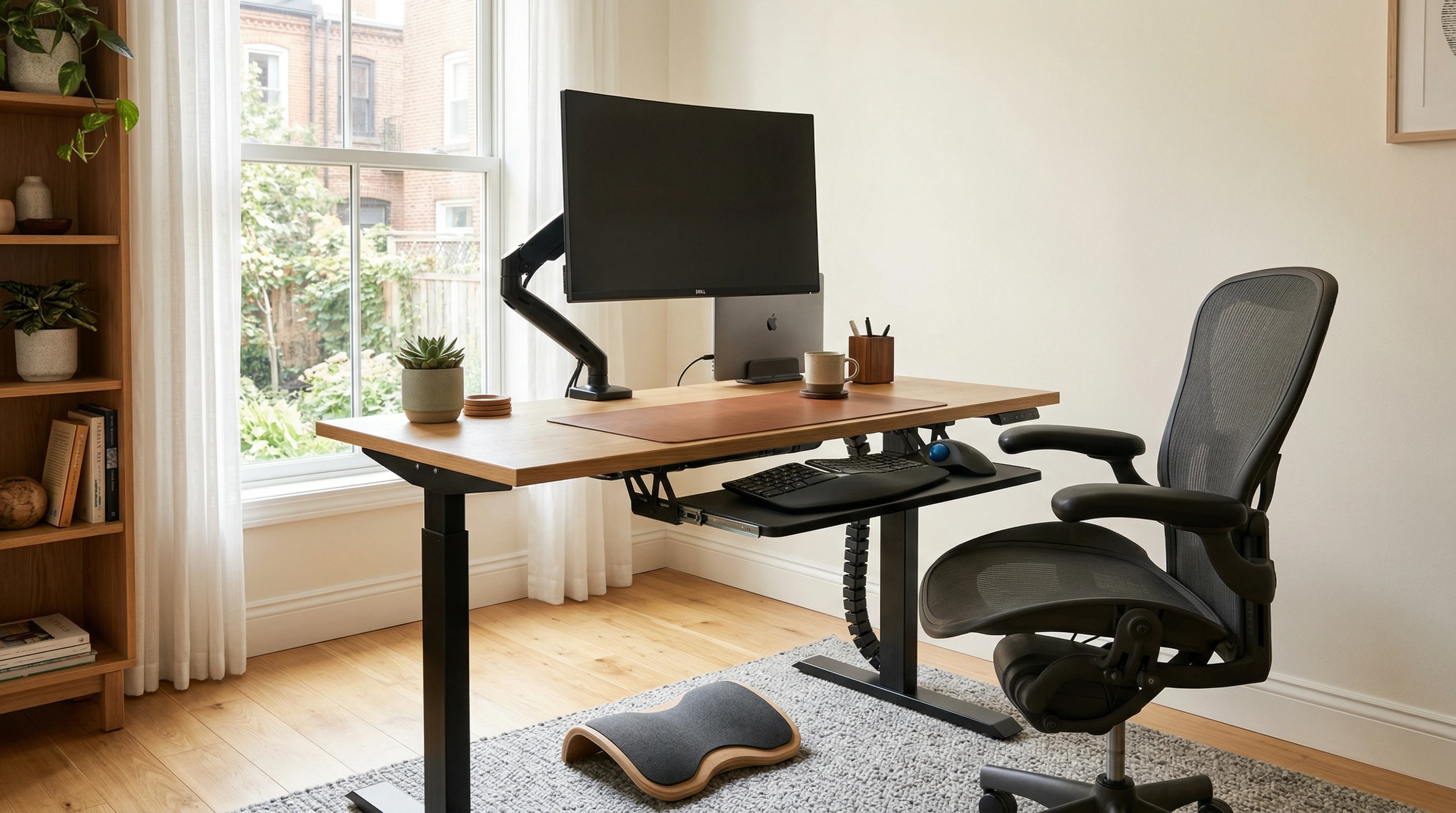
 Getting your home office set up for proper ergonomics isn’t just about comfort; it really makes a difference in how you feel at the end of the day. A few smart accessories can seriously upgrade your work hours, reducing back pain, easing eye strain, and improving focus.
I’ve tested plenty of gadgets and gear in my own home office, so here’s my go-to list of the best accessories for an ergonomic workspace.
Whether you’re working in a tight space or outfitting an entire room, these picks help you create a setup where your body feels good and your workflow runs smoothly.
Each accessory comes with a star rating (out of 5), my favorite pros, some cons, and honest thoughts based on my own experience. There’s also a handy FAQ section at the end to cover common questions.
1. Adjustable Standing Desk ★★★★★
An adjustable standing desk is probably the biggest upgrade for a comfortable workspace. Being able to switch from sitting to standing throughout the day keeps your energy up and helps prevent aches in your lower back and legs.
Pros
- Switches between sitting and standing, great for movement
- Custom heights fit any chair or user
- Tons of options for size and color
Cons
- Costs more than a basic desk
- Cheap motors can be a bit noisy
- Takes up more space than compact desks
I’ve found that even just a few hours standing can cut down on fatigue. Definitely worth checking out for anyone stuck at a desk all day. It can be tricky to get into the habit, but once you do, the benefits really become clear. Having a desk that moves with you also makes it easy to add more stretching or short breaks to your day.
2. Ergonomic Office Chair ★★★★½
Using a real ergonomic chair is a game changer for back and neck support. These chairs often come with lumbar support, adjustable armrests, and customizable height—basically everything you wish your dining chair had.
Pros
- Excellent posture support eases back strain
- Adjustments fit your body and desk perfectly
- Durable build, lots of style choices
Cons
- Good models can be pricey
- Assembly might require patience
- Takes up more room than a nonergonomic chair
Switching to a task chair with adjustable features really helped me break the habit of bad posture, which is super important for long-term work comfort. You really notice less fidgeting and more focus during long projects when your chair is supporting you.
3. Monitor Arm ★★★★☆
If you’re staring at a screen all day, a monitor arm lets you put your screen at eye level. This setup reduces neck tilt and eye strain and keeps your desk looking clean and organized.
Pros
- Brings your monitor to perfect height for your eyes
- Frees up space on your desk
- Easy swiveling and tilt adjustments
Cons
- Some arms don’t work well with heavy monitors
- Mounting can be tricky on thick desks
- May need tools for installation
This accessory helped me stop craning my neck toward my laptop, and my shoulders are a lot less tense now. Monitor arms are also great for supporting dual monitor setups or even for mounting tablets for creative workspaces. It’s surprising how much desk space you reclaim too.
4. Keyboard Tray ★★★★☆
A keyboard tray gives your wrists and forearms a natural angle when typing. It’s pretty handy if you want to keep wrist pain and carpal tunnel issues away.
Pros
- Brings keyboard to the ideal height for typing
- Some trays are fully adjustable and slide away when not needed
- Keeps your workspace cleaner
Cons
- Not all desks fit a tray easily
- Cheaper trays can wobble
- Additional install time
I really noticed my hands were less sore by the end of a full typing day after adding a tray. Adjustable trays let you get your elbows at the right angle, which can make long sessions of writing or coding way more manageable.
5. Ergonomic Mouse ★★★★½
Switching to an ergonomic mouse can help a lot if you spend hours clicking and scrolling. These are shaped to fit your hand’s natural curve for smoother movement and are available in a range of sizes and configurations.
Pros
- Better wrist angle reduces hand fatigue
- Comes in several shapes and sizes
- Vertical versions take even more pressure off your wrist
Cons
- Takes a few days to get used to the new shape
- Not all models are left-handed
- Some budget versions lack build quality
Once I switched, I couldn’t go back to the classic mouse; it’s that much easier on my wrist. I even found that my palm and thumb felt less tension after long editing sessions or design work. There’s a learning curve, but it’s worth sticking with it.
6. Laptop Stand ★★★★☆
If you work on a laptop, a stand is one of those accessories that’s both simple and extremely useful. It props up your screen to eye level and helps with air flow, which keeps your machine cooler and your neck happier. Some stands fold down small for portability.
Pros
- Elevates your screen for better posture
- Improves laptop cooling
- Great for compact spaces
Cons
- Typing on an elevated laptop is awkward, so you’ll want a separate keyboard
- Some stands only fit certain laptops
This is a best buy for anyone using their laptop as a main computer, especially if you’re mobile or working from different spots in your home. Pairing it with a wireless keyboard and mouse boosts comfort instantly.
7. Foot Rest ★★★★☆
A foot rest can make sitting for long stretches way more comfortable. It takes tension off your legs, especially if your feet don’t touch the ground securely in your chair. There are soft foam and mesh versions that feel cozy during long calls or deep focus work.
Pros
- Supports circulation and reduces leg fatigue
- Mesh and foam options for softer feel
- Angles adjust to your sitting style
Cons
- Certain shapes can be bulky
- Could slide around under your desk
I started using a foot rest on a whim and ended up keeping it for good. My legs just feel less tired. This small addition especially helps if your chair doesn’t have a lot of lower height adjustment, letting you plant your feet and keep good posture all day.
8. Anti-Fatigue Mat ★★★★☆
If you’re using a standing desk, an antifatigue mat provides cushion and support underfoot. That means your legs feel less sore by the end of the day and standing is much more doable for longer stretches.
Pros
- Reduces pressure on feet and joints
- Some have textured surfaces for massaging your feet
- Makes standing way more comfortable for long stretches
Cons
- Can take up floor space
- Could be a tripping hazard if you’re not used to it
This is a solid add-on if your desk hours involve a lot of standing. Even if you just stand for short periods, the extra cushioning really takes a load off your lower body, making transitions between sitting and standing much smoother.
9. Blue Light Blocking Glasses ★★★★☆
Hours of screen time can leave your eyes tired. Blue light blocking glasses help cut down on eye fatigue, dryness, and those annoying headaches that sneak up mid-day. Some models even look stylish enough for all-day wear, so you can use them outside of office hours.
Pros
- Reduces digital eye strain
- Plenty of affordable styles
- Useful even outside of work hours
Cons
- Might take some getting used to
- Some models slightly change color perception
I started wearing these for late-night editing sessions and noticed a real drop in eye irritation and sleep issues. They’re a low-cost way to cut down on fatigue, especially if you’re using screens constantly at work and home.
FAQ: Ergonomic Home Office Accessories
How do I know which accessories I really need?
Think about where you experience pain, fatigue, or awkwardness during your workday. If you’re always sore after sitting, try out an ergonomic chair or foot rest. For neck and eye pain, upgrade your screen height. Just a few key changes often make the biggest difference.
Are standing desks genuinely helpful?
Adding more movement does help, and an adjustable desk lets you change positions whenever you want. Just be sure not to stand all day; mixing it up is where the real benefit is. Try alternating every hour for a good blend of sitting and standing.
Is it worth getting ergonomic accessories if I don’t have a dedicated office?
Even small upgrades work wonders. A portable laptop stand, compact keyboard, or supportive seat cushion turns almost any space into an ergonomic work zone, even if you’re working at a kitchen table or living room. It doesn’t take fancy equipment to feel the results.
What’s the most budgetfriendly option?
Laptop stands, blue light glasses, and basic foot rests will usually cost less than larger items. Start with one or two small changes and build from there as you track down what makes you feel better during the day. Being comfortable doesn’t have to break the bank.
Do these accessories work for creative jobs too?
Anyone who spends long periods on a computer (writers, designers, coders, students) can benefit from these picks. Comfort and ergonomics don’t depend on your job title; it’s all about making the setup work for you.
Even short creative bursts are easier with a comfy workspace.
Investing a bit in the right home office accessories pays off every single workday. Comfort, good posture, and less eye strain all come with a few smart upgrades, making your workspace a place you actually like spending time in.
If you have a comfort tip of your own, I’d love to hear what works for you! And remember, staying sharp about your setup can lead to better energy, focus, and even a boost in your mood each day.
Thanks for stopping by and have a great day!