
VXE R1 Pro In-Depth Review: A Lightweight Wireless Gaming Mouse That Redefines Value
Introduction
The gaming mouse market has become increasingly competitive, with brands pushing lighter designs, faster sensors, and higher polling rates—often at premium prices. Although flagship mice from well-known brands frequently cost more than £100, not every gamer needs or wants to pay that much for superior performance. The VXE R1 Pro review enters the discussion at this point.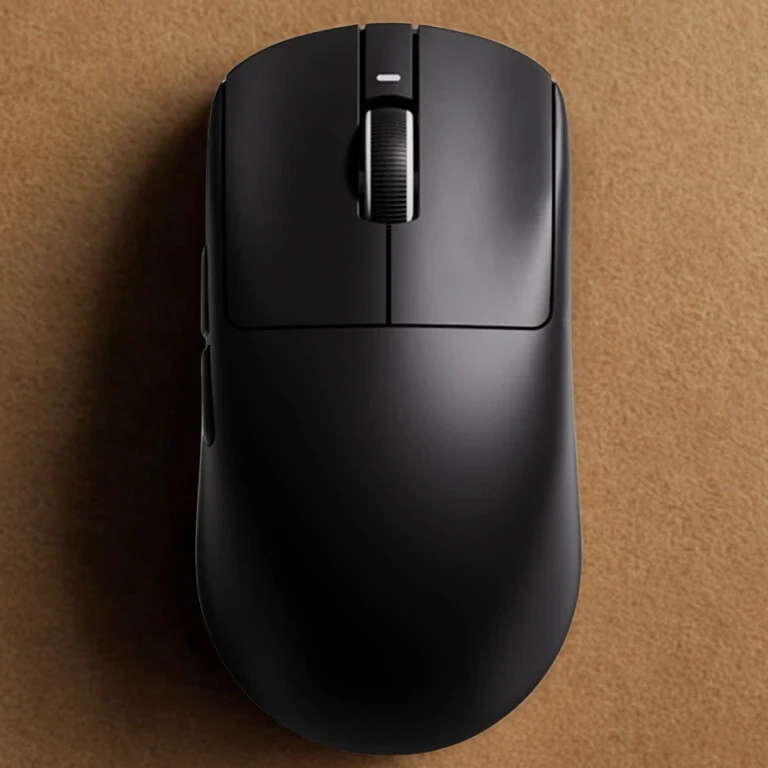
The VXE R1 Pro is a wireless, incredibly light gaming mouse that offers premium performance at an unexpectedly low cost. With its 48-gram design, PixArt PAW3395 sensor, and support for up to 4,000 Hz polling (with an optional dongle), it caters to enthusiasts and competitive FPS players seeking the best performance per pound.
In this in-depth review, we’ll break down everything you need to know about the VXE R1 Pro—from build quality and ergonomics to real-world gaming performance—before finishing with a conclusion and frequently asked questions.
Design and Build Quality
The VXE R1 Pro appears to have a simple, minimalistic design. RGB lighting strips, aggressive angles, and gaudy gaming aesthetics are all absent. Rather, the mouse chooses a straightforward, symmetrical shell that has a polished, contemporary appearance.
Weight and Construction
The VXE R1 Pro’s 48-gram weight is among its most remarkable features. As a result, it competes with some of the lightest wireless mice available, firmly placing it in the ultra-light category. The R1 Pro has a solid shell, which many users prefer for comfort and style, in contrast to many lightweight mice that rely on honeycomb cut-outs.
Despite its low weight, the mouse feels well-constructed. There is minimal flex when squeezing the shell, and no noticeable creaking during normal use.The overall build quality surpasses expectations for its price range, and the buttons fit perfectly.
Coating and Grip
The surface coating has a smooth, slightly matte texture that provides good grip without feeling sticky. It performs well for long gaming sessions and doesn’t attract fingerprints excessively. For players who tend to sweat, grip tape may still be beneficial, but the stock coating is more than adequate.
Sensor and Performance
The VXE R1 Pro uses the PixArt PAW3395 optical sensor, which is considered one of the best sensors currently available in consumer gaming mice.
Sensor Specifications
- Maximum DPI: Up to 26,000
- Tracking Speed: ~650 IPS
- Acceleration: Up to 50g
- Polling Rate: 1,000 Hz standard (up to 4,000 Hz with optional dongle)
In real-world usage, the sensor performs flawlessly. Tracking is smooth, precise, and consistent, with no noticeable jitter, acceleration issues, or spin-outs—even during fast flicks in competitive shooters.
Competitive Gaming Performance
For FPS titles like CS2, Valorant, Apex Legends, and Call of Duty, the R1 Pro excels. The combination of low weight and a top-tier sensor makes aiming feel effortless and responsive. Micro-adjustments are easy, and rapid movements are tracked accurately.
When paired with the optional 4K dongle, latency is reduced even further. While the difference between 1,000 Hz and 4,000 Hz may not be noticeable to every player, competitive and high-refresh-rate users may appreciate the added responsiveness.
Wireless Connectivity and Battery Life
Connectivity Options
The VXE R1 Pro supports:
- 2.4 GHz wireless mode (primary gaming mode)
- Wired mode via USB-C (for charging or wired play)
Bluetooth is not included, which may be a drawback for productivity users but makes sense given the mouse’s competitive gaming focus.
Battery Performance
The mouse is equipped with a 250 mAh battery, offering:
- Up to 70–75 hours of use at 1,000 Hz polling
- Reduced battery life when using 4,000 Hz polling
In practical use, most users will only need to charge the mouse once or twice per week. Charging is done via USB-C, and the mouse can be used while charging.
Ergonomics and Comfort
The VXE R1 Pro features a symmetrical shape that works best for:
- Claw grip
- Fingertip grip
- Hybrid claw-palm grip for medium hands
Palm grip users with larger hands may find the mouse slightly small, but for most gamers, the shape is comfortable and versatile. The low weight significantly reduces wrist and hand fatigue during long sessions.
The scroll wheel is well-textured, with defined steps that work well for both gaming and general use.
Buttons and Click Feel
The mouse includes six programmable buttons:
- Left click
- Right click
- Scroll wheel click
- DPI button
- Two side buttons
Click Quality
The main buttons are crisp and responsive, making them excellent for rapid clicking in FPS games. They are not overly stiff and strike a good balance between tactile feedback and speed.
The side buttons are functional and easy to reach, though they feel slightly less premium compared to the main clicks. This is a minor drawback and unlikely to impact most users during gameplay.
Software and Customization
The VXE R1 Pro uses proprietary software for customization, allowing users to:
- Adjust DPI levels
- Change polling rate
- Rebind buttons
- Create macros
While the software isn’t as polished or visually refined as Logitech G Hub or Razer Synapse, it is lightweight, functional, and stable. Once settings are saved, they are stored on the mouse, meaning the software doesn’t need to run in the background.
Real-World Use Beyond Gaming
Although clearly designed for gaming, the VXE R1 Pro also works well for everyday tasks such as browsing, office work, and creative applications. The lightweight design makes it easy to use for long periods, and the accurate sensor benefits tasks requiring precision.
However, users looking for features like Bluetooth switching or silent clicks may find it less suitable as a productivity-focused mouse.
Pros and Cons
Pros
- Extremely lightweight at 48g
- Excellent PAW3395 sensor performance
- Competitive wireless latency
- Strong value for money
- Comfortable for claw and fingertip grips
- Clean, minimalist design
Cons
- No Bluetooth connectivity
- Side buttons feel slightly basic
- Software is functional but not polished
- Battery life decreases at higher polling rates
Frequently Asked Questions (FAQ)
Is the VXE R1 Pro good for FPS games?
Yes, it is excellent for FPS titles thanks to its low weight, accurate sensor, and low wireless latency.
Does the VXE R1 Pro support 4,000 Hz polling?
Yes, with an optional 4K wireless dongle sold separately.
Can I use the VXE R1 Pro while charging?
Yes, it supports wired use while charging via USB-C.
Is the VXE R1 Pro good for large hands?
It may feel small for large palm-grip users but works well for claw and fingertip grips.
Does the mouse have onboard memory?
Yes, settings are saved directly to the mouse.
Conclusion
The VXE R1 Pro is a standout example of how far budget-friendly gaming hardware has come. By combining an ultra-lightweight design with a flagship-level sensor and responsive wireless performance, it delivers an experience that rivals mice costing significantly more.
Even though it doesn’t have some high-end features like Bluetooth and sophisticated software, these are fair trade-offs given its price. The VXE R1 Pro provides outstanding value, performance, and comfort for competitive gamers, particularly first-person shooter players.
If you’re looking for a lightweight wireless gaming mouse that focuses on performance over flashy extras, the VXE R1 Pro is one of the best choices available today. So is it the best gaming mouse 2026? Well the decision is yours!
Thanks for stopping by!