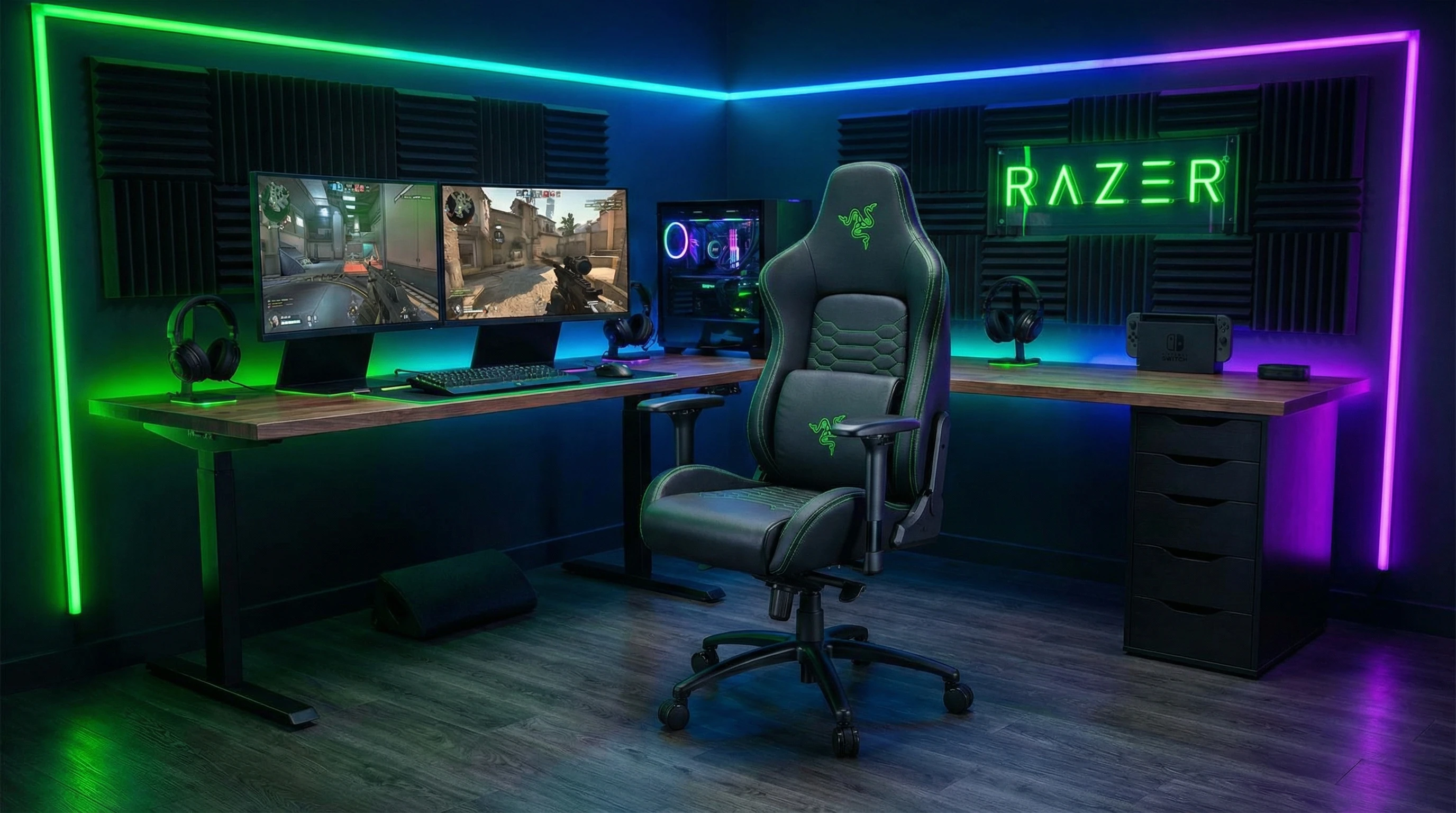
If you spend long hours gaming or working at your desk, you’ve probably realized just how important a good chair can be. I’ve had my fair share of budget chairs in the past, but switching to the Razer Iskur Series felt like a game changer. Whether you game on PC, create content, or just need something much more comfortable, the Razer Iskur Series Review will show you how it can work for all.
Here’s my experience, what I love about it, and a few things I think you should keep in mind before picking one up.
Star Rating: ★★★★☆ 4.5/5
What Makes the Razer Iskur Series Stand Out?
The Razer Iskur Series chairs are crafted for gamers, streamers, and anyone who spends real time locked into their chair. What really caught my eye is their emphasis on posture support and adjustment.
I’m a stickler for details, and the Iskur shows Razer thought through everything from top to bottom.
- Lumbar support: Unlike most gaming chairs that just toss in a soft pillow, the Iskur uses an adjustable built-in lumbar support system. It’s easy to set to match your spine, which makes a bigger difference than I expected.
- Padded comfort: The multilayered synthetic leather feels surprisingly premium. It holds up well over time without stretching or cracking, and the foam cushions are firm yet comfortable.
- Adjustability: Everything from the armrests to the backrest is changeable. I love being able to adjust the height, recline between matches, and move the armrests around for different setups.
- Bold gamer style: You get the iconic Razer look, with strong color accents, Razer logos, and plenty of green stitching if you’re into that vibe.
- Solid build: The frame feels sturdy, and even after months of daily use, I haven’t noticed any annoying creaks or shakes.
Features of the Razer Iskur Series
The Iskur Series comes packed with options designed for comfort and custom fit. Here’s a closer look at the main features that make a big impact when you use it every day:
Adjustable Ergonomic Lumbar Support: The built-in, adjustable lumbar support is the big highlight here. It’s made to match your spine’s shape and offers steady support, which is so important for long desk sessions.
4D Armrests: Move them up, down, forward, backward, in, or out. There’s a position for just about every style and desk setup, which I found a game changer when bouncing between gaming and typing.
High Density Foam Cushions: These don’t just look comfy—they stay responsive and supportive even after plenty of use. No more sagging, uneven seats.
Multilayered Synthetic Leather: Tough and scratch-resistant, this material looks sharp and is easy to clean with just a quick wipe down.
Reclining and Tilt: The backrest reclines up to 139 degrees, and there’s a tilt mechanism for those moments when you just want to lean back and relax.
Wide Base and Casters: Even when you stretch or shift your weight, the chair stays stable. The wheels roll easily across most floor types.
Two Sizes: The Iskur Series includes both the standard Iskur and the Iskur XL, ideal for bigger body types or anyone who wants a roomier seat.
Razer Iskur Series Pros and Cons
After weeks of daily use, here’s a rundown of what I’ve truly appreciated and where I think there’s still room to improve:
- Pros:
-
- Impressive lumbar support that actually helps with back fatigue
- Lots of customization for different desk arrangements
- Quality materials feel built to last
- Sharp looks, especially if you’re into the Razer aesthetic
- Comfortable for long workdays or epic gaming runs
- Cons:
-
- Higher price compared to some other gaming chairs
- Assembly needs some patience (but not as tough as some chairs I’ve owned)
- The bold design won’t fit every office decor
- Synthetic leather can warm up in hotter conditions
Why Is the Razer Iskur Series Popular Among Gamers?
There are plenty of gaming chairs out there, but the Iskur Series has earned a loyal fanbase. Here’s why I think it’s trending among gamers and streamers:
- Ergonomics: Gamers know that back pain can hit after a night of marathon play. The Iskur’s adjustable lumbar support seriously upgrades things compared to just a basic pillow. Sitting in the Iskur for a couple of weeks, I noticed my posture really got a boost.
- Style: The bold Razer branding meshes well with gaming setups filled with RGB lighting and custom rigs. If you love the gamer look, this fits right in.
- Brand Reputation: Razer is a popular name in gaming, and the Iskur reflects their strong attention to detail you’d expect from their other gear.
- Comfort for Long Sessions: Whether you’re streaming, working, or gaming for hours, you’ll appreciate the way this chair supports you. No more fidgeting or discomfort after long sessions.
Setting Up the Razer Iskur Series Chair
Putting the Iskur together is simple enough, but leave yourself a bit of time and space to spread out. Here’s a quick step-by-step based on my build:
- Lay out all parts and hardware; the packaging is neat and instructions are clear.
- Begin with the chair base, adding the wheels and gas lift first, then attach the seat.
- The backrest connects to the seat with a couple of bolts. Getting a friend to help here is smart—the parts are a little heavy.
- Once the base and back are set, attach the side covers and armrests. You can tweak the 4D armrests after everything is together, so don’t sweat the exact angles up front.
- Tighten everything, then adjust the lumbar, height, and tilt to fit your comfort zone. The setup guide has handy tips if you get stuck.
Setup generally runs 30–45 minutes. I didn’t have any major issues, and the chair felt solid right after assembly.
Is the Razer Iskur Series Worth It?
After leaving my old chair behind and using the Iskur XL for a few months, I’m honestly happy with how it’s held up, especially with all the hours I spend at my desk.
The lumbar support is a standout at this price point. If you care about lasting comfort and love a bold style with plenty of custom fit options, the Razer Iskur Series is worth checking out.
Whether you game, stream, edit videos, or just spend long stretches at your desk, a high-quality chair like this really does make a difference in both comfort and focus.
Thats it for now peeps, have a great day!